
Workday
Workday, Inc.Business
4.246.47K Reviews
- Version
- 2026.11.0
- Installs
- 10.00M
- Age Rating
- Everyone
Screenshots
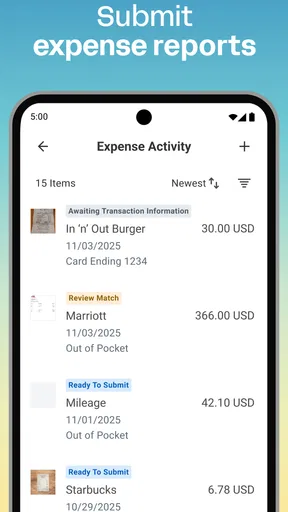
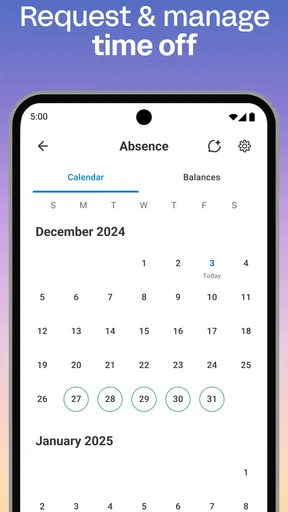
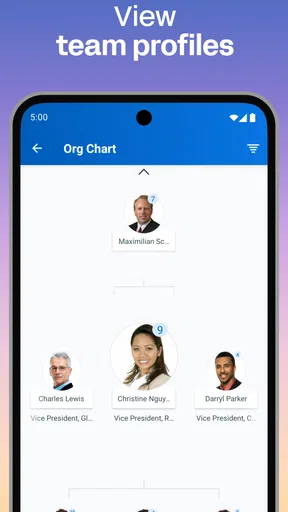
Our Review of Workday
 Analysis by Appyee
I judge a workplace app less by how many buttons it offers than by whether I can find the right task when I’m busy, tired, or away from a desk. Workday is built for employees and managers who need to handle workplace administration on a phone. Its usefulness depends partly on how an employer has set it up, so I see it as a practical front door to work tasks rather than a universal replacement for every company system.
Reading the screen and finding the right task
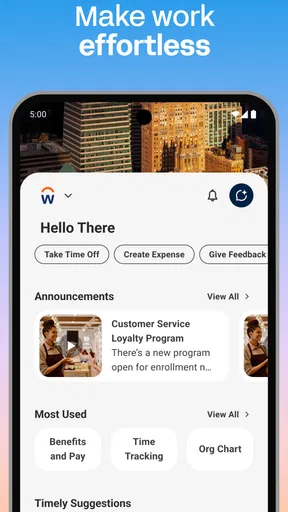
The first thing I notice is that the app groups work actions into labeled areas instead of presenting everything as one long feed. That structure can help when I’m trying to move between a schedule, a request, or an employee-related task without remembering a particular command. The dashboard also gives a quick starting point, which is more useful on a small screen than having to search through a desktop-style menu each time.
That said, a tidy layout is not the same as a simple experience for everyone. Workday brings together many kinds of workplace activity, and the labels may feel familiar to someone who already knows their employer’s processes but less obvious to a new hire. I’d take a moment during a quiet period to explore the sections I’m likely to need, rather than waiting until a shift change or deadline to learn where a request lives.
Who benefits from a phone-first workplace hub
I can see the appeal for employees who mainly need to check information or submit routine requests without opening a laptop. A manager may value having approvals close at hand, especially when a decision is small but holding it up would delay someone else. The app is most compelling when an organization has already made it part of its everyday workflow; it is less useful as a standalone download for someone whose employer does not use Workday.
It also suits people who move between work locations or do not spend the day at a desk. A worker can deal with a brief administrative task during a suitable break instead of saving every small item for later. I would still keep work actions within appropriate breaks and workplace rules: being able to reach a task from a phone does not mean every task needs an immediate response.
Using Workday in everyday work
I find that Workday is most useful when I treat it as a quick route into familiar workplace tasks, rather than expecting a phone to replace every part of a work system. In this section, I’d look at how to make a routine easier to manage and where a little preparation can prevent a rushed mistake. That everyday perspective also helps clarify which tasks are better left for a larger screen.
Navigation, readability, and a realistic routine
So, first things first—let's talk about getting started. Downloading the app is a breeze. Available on both Android and iOS, you just head to your respective app store, hit download, and you're good to go. Once installed, signing up is straightforward. You’ll need to enter your work credentials, which might require a bit of patience if you’re not the most tech-savvy, but once that’s done, you're greeted with a clean, user-friendly interface.
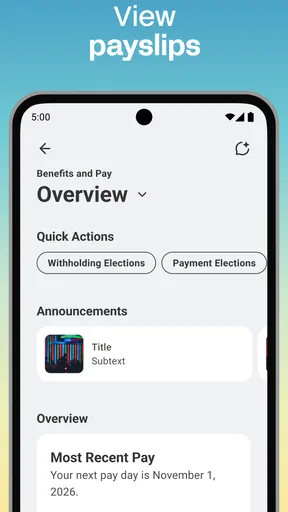
Speaking of the interface, it's pretty intuitive. The layout is sleek, and the colors are easy on the eyes—no glaring bright lights here, thank goodness. Navigating through the app is as simple as swiping through your favorite social media feed. Each section is clearly labeled, making it easy to find what you're looking for, whether it’s checking your pay stubs, managing tasks, or keeping track of your schedule.
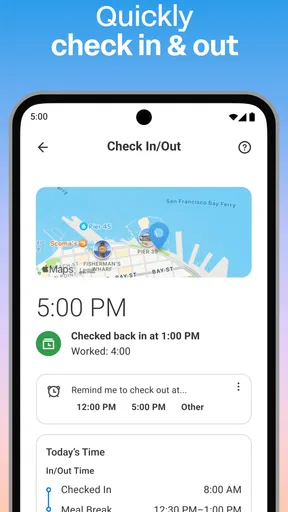
The dashboard is where the magic happens. You get a quick overview of your workday (no pun intended) right at your fingertips. Need to approve a timesheet or request time off? It’s all right there, under easy-to-find tabs. I found myself saving time, which is always a win in my book.
Here’s a routine where that convenience makes sense: before leaving for the day, I can check what needs attention, submit a time-off request while the details are fresh, and leave an approval for a manager to review when appropriate. The value is not that a phone makes these decisions better; it reduces the chance that a small administrative item gets forgotten because I was away from my computer. For anything involving a complicated explanation or several documents, I’d rather use a larger screen if my workplace offers that option.
Motor and sensory considerations
For someone who finds repeated typing uncomfortable, a clearly grouped set of common work actions can reduce the amount of navigation needed. I would still expect some tasks to involve careful taps and text entry, particularly when changing personal details or writing a request. If fine motor control is a concern, it is sensible to try the app with the phone’s own accessibility settings and see whether the controls and text-entry steps work comfortably in practice.
The original impression of restrained colors and labeled sections is encouraging, but I wouldn’t treat that as proof that every screen will suit every visual or cognitive need. Workplace content can be dense, and a manager’s view may ask more of a reader than a simple personal request. I’d use the most familiar route for recurring tasks and avoid trying to interpret a complex report in a noisy or rushed setting.
Sound and attention matter too. A mobile work app can bring job-related information into moments that otherwise feel personal, so I prefer to check it deliberately rather than leave it as a constant distraction. If notifications or on-screen information are difficult in a particular environment, the practical answer may be to handle the task later in a quieter place, subject to the urgency and the employer’s process.
Useful capabilities and their trade-offs
Where do I even begin with the features? Workday is packed with tools designed to make your professional life easier. One of my personal favorites is the real-time analytics. You can pull up reports and see data updated in real time, which is a game-changer if you're in a management position.
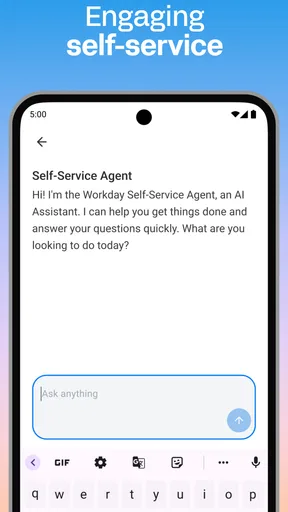
Another nifty feature is the self-service capabilities. You can manage personal info, like address changes and direct deposit details, without having to go through HR. It's like having a mini HR department right in your pocket!
Self-service is especially useful for small changes that are easy to postpone, but I would slow down before confirming anything with consequences for pay or personal records. A phone makes access convenient; it does not make a sensitive change less important to review. My practical tip is to check each field before submitting and keep any confirmation or follow-up instructions the app presents, rather than assuming that tapping a button means the whole process is finished.
The reporting side has a different audience. A manager who needs a quick view while away from a desk may appreciate having information nearby, while someone preparing a detailed analysis may prefer a desktop workflow with more room to compare and interpret information. “Real time” can be helpful for a timely decision, but it is still worth checking what a report represents and whether it answers the particular question at hand.
Access across places and work patterns
Now, let's talk about collaboration. With Workday, staying in touch with your team is seamless. The app integrates with other communication tools, allowing for smooth transitions between chatting with a colleague and diving straight into a project. Plus, the mobile accessibility means you're not tied to your desk—you can literally work from anywhere.
In practice, I’d think of mobile access as a way to keep routine work moving, not as a reason to do every part of a job on a phone. Someone travelling between sites may be able to check a schedule or respond to an appropriate work item, while a person with a fixed desk routine may find the desktop version more comfortable for longer sessions. The best choice depends on the task: quick review and straightforward requests suit a phone better than sustained reading or detailed comparison.
Workday is a business app from Workday, Inc., and it is free to install, with an Everyone age rating. It has a 4.3 average from around 247,000 ratings and more than 10 million installs. Those figures suggest broad adoption, but they don’t tell me whether a particular employer has enabled the functions an employee needs. Before relying on it for a deadline, I’d confirm that the relevant task is available in that organization’s setup.
How it compares with other ways of handling work
Compared with a collection of separate company apps, Workday’s main advantage is having a broad set of employee and manager tasks in one workplace environment. That can save switching when an organization has configured the pieces people actually use. By contrast, a dedicated scheduling or messaging app may feel more direct if the need is limited to one activity, and a browser or desktop system can be easier for longer forms, detailed review, and sustained keyboard work.
I wouldn’t choose it simply because an all-in-one app sounds convenient. The deciding question is whether your employer uses it as the place to complete your real tasks. If work information is scattered across other systems, Workday may cover only part of your routine. If your organization relies on it for employee administration and approvals, carrying that access can be genuinely useful without making it the best tool for every conversation or project.
Performance, reliability, and where friction remains
But what about performance? The app runs smoothly, with minimal lag, even when accessing data-heavy reports. It’s reliable, which is crucial. I haven't encountered any annoying crashes or bugs that might make you want to throw your phone out the window—always a plus!
The main friction I’d prepare for is not necessarily speed; it is figuring out which options apply to a particular role and employer. A new employee may need help with credentials or with understanding internal terminology, and a manager may need to distinguish a quick approval from a decision that deserves a longer review. If a screen does not match the steps your workplace expects, checking with the appropriate internal contact is safer than guessing or submitting the wrong request.
Security is a top priority, and Workday delivers. The app uses robust security protocols to ensure your data is protected. Knowing that my sensitive work information is secure gives me peace of mind. Plus, the regular updates mean they’re always on top of any potential vulnerabilities.
Because the app can involve employment and personal information, I treat access with the same care I would give other sensitive work tools: I avoid leaving a work session open where someone else can use my phone, and I review personal changes before sending them. These are sensible habits rather than a reason to avoid mobile access. For people who share devices or have limited control over their phone, that context may make a company-approved computer a more comfortable option.
Version, setup, and choosing the right device
The current version is 2026.01.2, and the minimum operating-system requirement is version 12. I’d check the phone’s software before installing, then make sure I can sign in with the credentials my employer expects. Installation alone does not establish that an organization has enabled every tool, so the best first test is a routine task that you already know how to complete through your workplace.
For someone who relies on a larger display, a physical keyboard, or a quieter reading environment, the phone app need not be the only route. I’d use mobile for brief actions and switch to a computer when a task calls for sustained attention or careful data entry. That division is not a weakness; it is a realistic way to use a work platform without forcing every workflow into a small screen.
Who should use it, and who may prefer another route
Workday is a solid choice for employees and managers whose organizations use it and who want work administration within reach. It is particularly suitable for occasional checks, straightforward self-service, and approvals that can be handled responsibly on a phone. Someone who rarely needs workplace tasks outside a computer may have little reason to make the mobile app part of their routine.
I’d also hesitate to recommend a phone-first approach to anyone who finds small-screen reading or tapping tiring, or who needs a detailed explanation before acting on a request. In those cases, a desktop workflow or help from a workplace contact may be better. The same applies when an employer uses a different system: another app that matches the organization’s actual process will be more useful than installing Workday without a clear purpose.
Final Thoughts
In conclusion, Workday is a solid choice for anyone looking to streamline their work processes. It’s packed with features that not only help manage your day-to-day tasks but also enhance productivity. While no app is perfect and there might be a learning curve for some users, the benefits definitely outweigh any initial hurdles.
So, if you're ready to take your work life to the next level, give Workday a try. You might just find it’s the helping hand you never knew you needed.
My inclusive verdict is positive but conditional: Workday can make familiar workplace tasks easier to reach, yet comfort depends on the person, the phone, and the employer’s setup. I’d recommend trying it with one low-stakes task first, then deciding which activities genuinely feel easier on mobile. That small test gives a clearer answer than judging an all-in-one work app by its promise alone.
Privacy and Permissions
See what permissions an app requests and how it handles your data.
- Calendar
- read calendar events plus confidential information
- Location
- approximate location (network-based), precise location (GPS and network-based)
- Photos/Media/Files
- read the contents of your USB storage
- Storage
- read the contents of your USB storage
- Camera
- take pictures and videos
- Microphone
- record audio
- Wi-Fi connection information
- view Wi-Fi connections
- Other
- view network connections, full network access, control Near Field Communication, run at startup, control vibration, prevent device from sleeping, install shortcuts, read Google service configuration
Verdict
Strengths of Workday
- Intuitive user interface for easy navigation.
- Comprehensive HR and payroll features.
- Real-time data access and reporting.
- Mobile app for on-the-go management.
- Regular updates with new features.
Limitations of Workday
- Steep learning curve for new users.
- Requires stable internet connection.
- Limited customization options.
- Occasional sync issues on mobile.
- High cost for small businesses.
Similar Picks in This Category
View All
LinkedIn: Community & Network
LinkedIn3.8

Zoom Workplace
zoom.com4.1

Microsoft Teams
Microsoft Corporation4.6

Meta Business Suite
Meta Platforms, Inc.4.6

Webex Meetings
Cisco Systems, Inc.4.5

TeamViewer Remote Control
TeamViewer4.4
Frequently Asked Questions
What is Workday and what are its main features?
Workday is a comprehensive human capital management (HCM) and financial management application designed for businesses of all sizes. It offers features such as payroll, talent management, workforce planning, and analytics. The app provides real-time data access, enhancing decision-making and streamlining business processes. Additionally, it integrates smoothly with other enterprise tools.
Is Workday suitable for small businesses?
Yes, Workday is suitable for small businesses as well as large enterprises. It offers scalable solutions that can adapt to the specific needs and growth of a business. While it may have more features than a small business initially needs, its flexibility ensures it can grow alongside the business, providing valuable insights and automation.
How secure is my data on Workday?
Workday prioritizes security and employs advanced encryption protocols to safeguard user data. The app is designed with robust security measures, including two-factor authentication and regular security audits. Compliance with global data protection standards ensures that sensitive information is protected against unauthorized access, making it a reliable choice for data management.
Can Workday integrate with other software tools we use?
Yes, Workday offers extensive integration capabilities with numerous third-party software tools. It supports integration with popular business applications such as Salesforce, Slack, and Microsoft Office, among others. This interoperability facilitates seamless data exchange, optimizing workflows and enhancing productivity across different platforms within an organization.
Is there a mobile version of Workday available?
Workday provides a mobile application compatible with both Android and iOS devices, allowing users to access key features on the go. The mobile app supports functions like time tracking, expense management, and team collaboration, ensuring users can perform essential tasks from anywhere, maintaining productivity and connectivity outside the office.
